











The Immutable Backup Paradox: S3 Object Lock, Self-Hosted SeaweedFS vs. Ceph, and Why Root Always Wins
When designing a ransomware-resilient backup architecture, engineers invariably reach for S3 Object Lock (COMPLIANCE mode)—the Write-Once-Read-Many (WORM) specification that forbids anyone, including the root account of the S3 tenant, from deleting or overwriting an object version before its RetainUntilDate expires.
When you self-host the S3 storage layer on your own hardware, however, you immediately confront a foundational systems security truth:
No self-hosted object store is “fully immutable” by itself. S3 Object Lock is enforced strictly at the HTTP/S3 API layer—meaning the real immutability guarantee lives in the trust boundaries, clock discipline, and substrate architecture around the bucket.
Here is the complete 2026 adversarial evaluation of self-hosted and cloud S3 Object Lock engines (SeaweedFS, MinIO, Garage, RustFS, Ceph RGW, Backblaze B2, and Wasabi), the two substrate bypasses that defeat naive on-prem WORM deployments, how backup clients (Kopia, restic, and Proxmox Backup Server) interact with locked buckets, and the concrete hardening blueprint required to make on-prem + off-site backups genuinely un-deletable. Test the live S3 Object Lock Substrate & Ransomware Survivability Simulator at the bottom of this dispatch to model ransomware and root-compromise scenarios across each stack.
1. The Two Substrate Holes That Decide Whether a Backup Is Actually Immutable
Why isn’t turning on x-amz-object-lock-mode: COMPLIANCE on a self-hosted Linux storage box the end of the story? Because an attacker who compromises your infrastructure during a ransomware intrusion doesn’t play by the rules of the S3 REST API.
[!NOTE] Why
GOVERNANCEMode Fails the Ransomware Bar: S3 Object Lock offers two retention modes:GOVERNANCEandCOMPLIANCE.GOVERNANCEmode does not survive a compromised admin credential because any identity holdings3:BypassGovernanceRetentioncan pass thex-amz-bypass-governance-retention: trueheader to delete locked versions (and on AWS S3, the web management console sends that bypass header by default!). OnlyCOMPLIANCEmode refuses deletion, overwrite, retention-shortening, and mode-downgrade from every S3 user—including the S3 tenant root account.
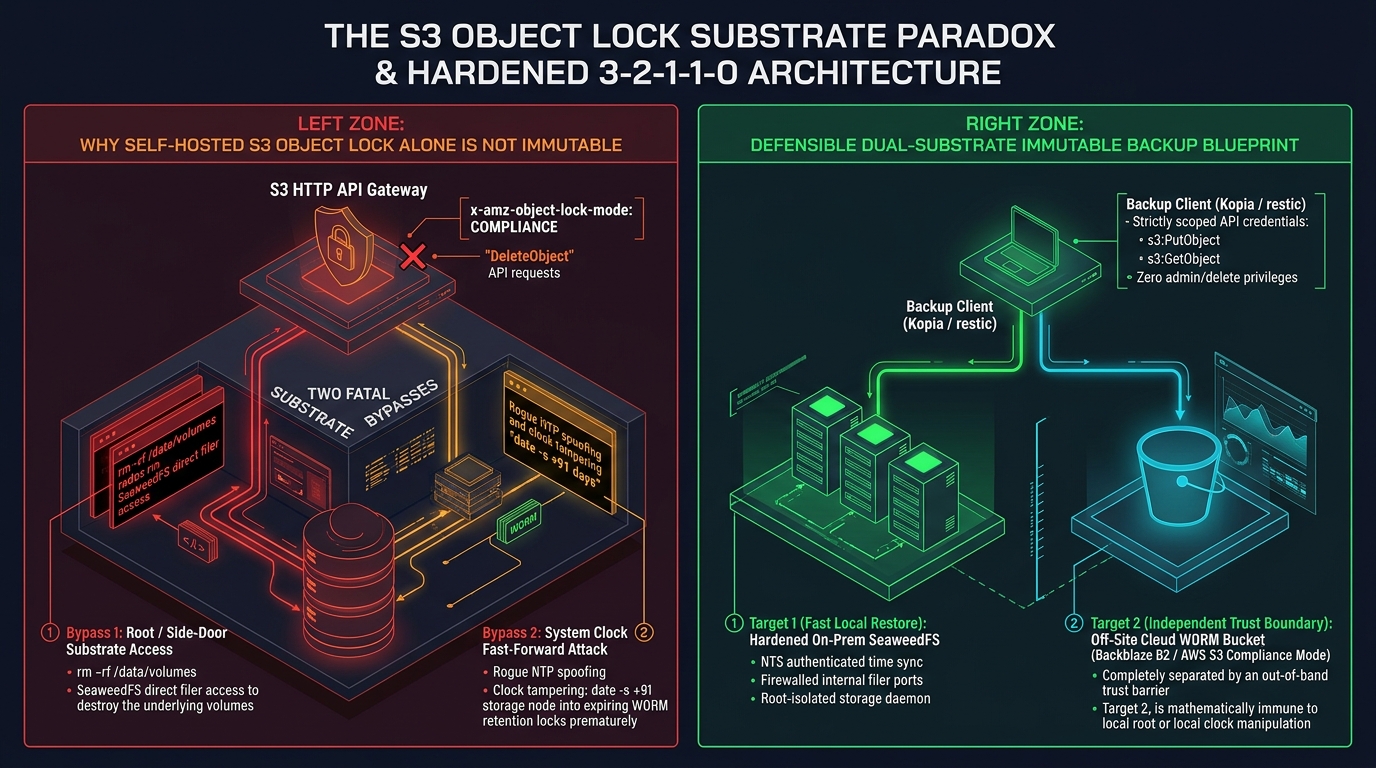
+-------------------------------------------------------------------------------+
|               THE SELF-HOSTED S3 OBJECT LOCK TRUST BOUNDARY                   |
+-------------------------------------------------------------------------------+
|                                                                               |
|  [ S3 HTTP/REST API Layer (Port 8333 / 9000 / 7480) ]                         |
|    ├── Enforces x-amz-object-lock-mode: COMPLIANCE                            |
|    ├── Blocks DeleteObject(VersionId) until RetainUntilDate                   |
|    └── Blocks PutObjectRetention from shortening lock window                  |
|                                       |                                       |
|    ==================== [ S3 API TRUST BOUNDARY ] ====================        |
|                                       |                                       |
|  [ Underlying Linux / Storage Substrate (Where Compliance Mode Is Blind) ]    |
|    ├── HOLE #1: Root / Side-Door Substrate Access                             |
|    |     * Root SSH/IPMI runs `rm -rf /data/volumes/*.dat` or `docker down -v`|
|    |     * Direct SeaweedFS Filer (:8888) / `weed shell` / Ceph `rados rm`    |
|    └── HOLE #2: System Clock Fast-Forward Attack                              |
|          * `date -s "+91 days"` or spoofed UDP NTP advances system clock      |
|          * Storage daemon sees now() > RetainUntilDate and allows deletion!   |
|                                                                               |
+-------------------------------------------------------------------------------+
What Compliance Mode Defeats vs. What Defeats It
In a hands-on June 2026 adversarial lab against an S3 Compliance-locked bucket (restic 0.18.1 + MinIO with 7-day COMPLIANCE default retention), handing the attacker full S3 root API credentials blocked 6 out of 6 destructive S3 API attacks:
- Direct
DeleteObjectwithVersionId→ Refused (AccessDenied) - Mass
mc rm --recursive --force --versionspurge → Refused - Bucket deletion (
rb --force) → Refused - Clearing retention headers → Refused
- Shortening the
RetainUntilDatewindow → Refused - Downgrading
COMPLIANCEtoGOVERNANCE→ Refused
Yet the moment the attacker steps below the S3 HTTP API into the host operating system, compliance mode evaporates through two substrate holes:
Hole #1: Root on the Storage Server & Vendor Side-Doors
S3 Object Lock is a metadata check inside the storage daemon—not a physical property of the disk. On disk, “immutable” objects are ordinary files or volume extents. Shell access as root on the storage host (or a careless docker compose down -v) deletes the underlying volume files instantly.
Even without touching raw disk blocks, storage engines have native administrative side-doors below the S3 gateway. As the Ceph Project’s December 2025 RGW Deep Dive states explicitly (complete with a worked example of deleting a compliance-locked object via rados rm):
“It’s essential to understand what Object Lock protects against and what it does not. Object Lock enforcement occurs at the S3 API layer… What Object Lock does NOT protect against: Direct RADOS-level operations (
rados rm,radosgw-admin bucket rm --purge-objects); physical destruction of storage media; cluster-level administrative actions by users with Ceph admin credentials… Someone with root access to the underlying storage infrastructure operates at a different trust boundary entirely.”
Hole #2: The System Clock Fast-Forward Attack (now() > RetainUntilDate)
A compliance lock is simply an ISO-8601 timestamp (RetainUntilDate) evaluated against the storage server’s CLOCK_REALTIME. On any self-hosted server whose clock the attacker can manipulate—either via host root (date -s "+91 days") or by spoofing unauthenticated UDP port 123 NTP packets—they can wind time past the retention date and delete every “immutable” backup cleanly through the standard S3 API.
Why Managed Cloud Changes the Threat Model (and Where Its Boundary Lives)
On AWS S3, Backblaze B2, or Wasabi, you have neither filesystem/SSH access nor control over the provider’s clock—the provider owns the entire substrate, so both footnotes vanish. Even there, the trust boundary simply moves up one level: deleting the entire cloud account. Both AWS and Backblaze state plainly that closing/deleting the parent account is the one action that destroys compliance-locked data early—which is why your off-site cloud backup bucket belongs in a dedicated account locked down with hardware MFA and minimal administrators.
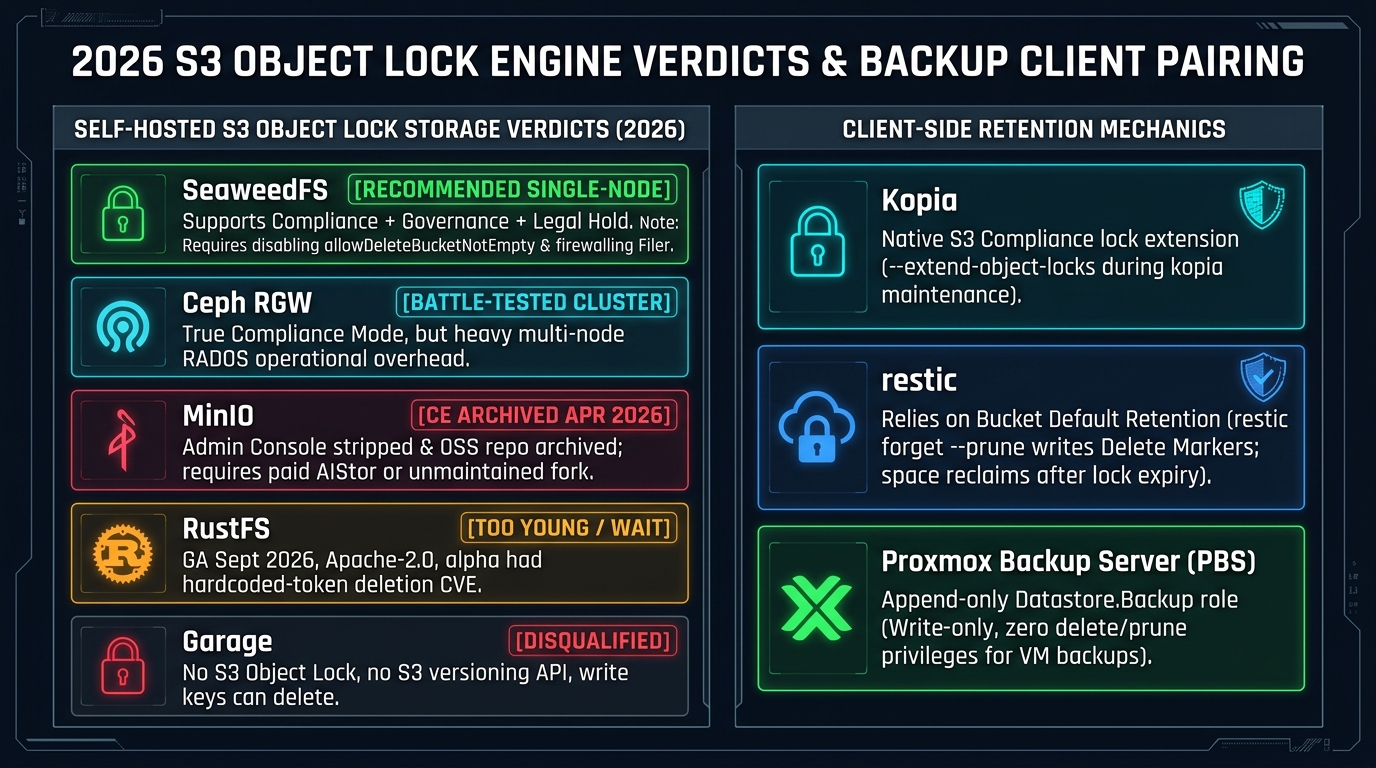
2. 2026 S3 Object Lock Engine Verdicts: Self-Hosted, Cloud & Purpose-Built
Evaluating self-hosted S3 engines in late 2026 requires looking past feature-matrix checkboxes to independent regulatory validation (such as Cohasset Associates assessments for SEC Rule 17a-4(f), FINRA Rule 4511, and CFTC Rule 1.31), open-source licensing stability, and single-node operational weight.
| Candidate | S3 Object Lock (COMPLIANCE) |
License | Single Small Server? | 2026 Production Verdict & Operational Bottom Line |
|---|---|---|---|---|
| SeaweedFS | ⚠️ Supports (with caveats) | Apache-2.0 (Core) | ✅ Yes (~60–100 MB idle RAM) | Legitimate Single-Box Pick—Verify Adversarially: Wiki documents full Compliance + Legal Hold + Default Retention, but lacks third-party Cohasset/Veeam validation, ships with -allowDeleteBucketNotEmpty=true (#11660), and has coarse IAM. |
MinIO (AIStor) |
✅ Supports (Cohasset) | AGPLv3 (Archived) / Commercial | ✅ Yes | Best Implementation, Worst Licensing Story: Cohasset-assessed and best writeonly IAM, but free CE was wound down in 2025–2026 (minio/minio archived Apr 2026). New builds mean paid AIStor (~$96k/yr for 400 TB) or a community fork. |
Garage (v2.x) |
❌ Does Not Support | AGPLv3 | ✅ Yes (~30–60 MB idle RAM) | Disqualified: No S3 Object Lock API and no S3 Versioning API. --write keys can delete objects, and malicious deletes replicate across all nodes. |
RustFS (1.0 GA) |
⚠️ Claimed, Least Proven | Apache-2.0 | ✅ Yes (SNSD) | Watch, Don’t Deploy Yet: Reached 1.0.0 GA on Sept 16, 2026, but alpha line suffered critical auth flaws (CVE-2025-68926 hardcoded gRPC token, CVE-2026-24762 log leak, console XSS). Needs a year of clean hardening. |
| Ceph RGW | ✅ Supports (Cohasset) | LGPL-family | ❌ No (3+ node cluster) | Deploy Only If You Already Run Ceph: Full lock + legal hold (Cohasset-assessed; Tentacle+ enables lock on existing buckets), but MON/MGR/OSD cluster ops is heavy overkill for one backup box. |
| AWS S3 | ✅ Reference Spec (Cohasset) | Proprietary Cloud | n/a | Strongest Guarantee: Attacker has zero access to substrate or clock. |
| Backblaze B2 | ✅ Supports | Proprietary Cloud | n/a | Cheapest Credible Second Copy ($6.95/TB/mo): Full Compliance mode + default retention, free API calls, no minimum duration penalty, and genuine write-no-delete app keys. |
| Wasabi | ✅ Supports | Proprietary Cloud | n/a | $7.99/TB/mo (Watch the 90-Day Rule): Zero egress/API fees, but enforces a 90-day minimum storage duration (and 1 TB monthly minimum) that penalizes churn-heavy backup repos. |
| Veeam Hardened Repo | n/a (Linux chattr +i) |
Commercial | ✅ Yes (XFS) | Single-Use Deploy Credentials, Weak Against Host Root: Protects against a compromised Veeam server, but root on the Linux repo host can run chattr -i (per Veeam KB4348) and delete everything. |
Proxmox Backup (PBS) |
n/a (Role + Protected Flag) | AGPLv3 | ✅ Yes | Ideal for VMs: Datastore.Backup role is strictly write-no-delete, and PBS 4.2 adds S3 datastores—but its protected snapshot flag is admin-removable rather than a time-based lock. |
rest-server / borg |
n/a (--append-only) |
BSD / Apache OSS | ✅ Yes | Protects Against Client Compromise Only: Refuses client deletes, but has no retention clock; pruning/compaction must run from a separate trusted host. |
Deep Dive on the Self-Hosted Candidates
1. MinIO’s 2025–2026 Community Edition Sunset (CVE-2026-97731)
Technically, MinIO has the strongest self-hosted Object Lock implementation: it is Cohasset-assessed for SEC 17a-4(f) and ships with a best-in-class canned writeonly policy (s3:PutObject without DeleteObject). However, its free self-hosted path collapsed between 2025 and 2026:
- May 2025: The web Admin Console was stripped from the open-source Community Edition.
- October 15, 2025: Final Community Edition release published; official binaries and Docker images discontinued.
- December 2025 – April 2026: Upstream announced maintenance mode and archived the
minio/minioGitHub repository ("THIS REPOSITORY IS NO LONGER MAINTAINED"), directing users to proprietary AIStor Free (single-server, license file required) or AIStor Enterprise (secondary pricing reported around $96,000/year for 400 TB). - When CVE-2026-97731 (unsigned
x-amzheader bypass) disclosed in 2026, no upstream CE patch was issued—fixes exist only in community forks (OpenMaxIO,pgsty/minio).
2. Why RustFS Needs Another Year (CVE-2025-68926 & CVE-2026-24762)
Written in Rust under the Apache-2.0 license (with a pledge to keep the core engine free of commercial license gates), RustFS reached 1.0.0 GA on September 16, 2026 after starting development in February 2024. While its feature matrix marks Object Lock (WORM) as available, its pre-GA alpha line suffered the exact class of authentication vulnerabilities that invalidate an immutability guarantee:
- CVE-2025-68926: A hardcoded static gRPC token in
1.0.0-alpha.1throughalpha.77allowed any network attacker to execute privileged operations—including deleting stored objects and modifying IAM access policies. - CVE-2026-24762: Secret credentials were written in plaintext to
INFOlogs. - Console Stored-XSS (
alpha.83): Allowed full administrator account takeover. Wait for at least a full year of production hardening without critical auth advisories before entrusting RustFS with ransomware recovery archives.
3. Garage’s Internal vs. S3 Versioning Gap
Garage (v2.x) is an exceptional ~30–60 MB RAM geo-distributed object store for small hardware, but it is a trap for immutable backups: while Garage versions metadata internally in its engine, it exposes no S3 Versioning API and no S3 Object Lock API. Worse, its access model has only three per-bucket key grants (--read, --write, --owner), and a --write key has full permission to delete objects—meaning a compromised backup client can wipe the bucket and watch Garage replicate those deletes across every node in the cluster.
3. SeaweedFS-Specific Landmines & Hardening Blueprint
SeaweedFS (4.x line) is the pragmatic Apache-2.0 single-server pick: one Go binary (weed server) runs Master, Volume, Filer, and S3 gateway in ~60–100 MB of idle RAM, supporting Reed-Solomon erasure coding (e.g., 10+4) and documenting the full S3 Object Lock API (Get/PutObjectLockConfiguration, Get/PutObjectRetention, Get/PutObjectLegalHold, Default Bucket Retention, and retention periods up to 100 years). (Note: A commercial SeaweedFS Enterprise layer sells features like point-in-time recovery and auto EC repair for $2/TB/mo above 25 TB, while the core and S3 Object Lock remain Apache-2.0).
Because SeaweedFS’s Object Lock support is relatively young and lacks a third-party Cohasset assessment (to the point that some outdated 2026 secondary comparison articles still erroneously list it as unsupported), you must neutralize three SeaweedFS-specific landmines on day one:
Landmine 1: GitHub Issue #11660 (-allowDeleteBucketNotEmpty=true Default)
In standard AWS S3, calling DeleteBucket on a bucket that holds objects fails with HTTP 409 BucketNotEmpty.
As documented in SeaweedFS GitHub Issue #11660 (opened October 8, 2026 against v4.47), SeaweedFS’s S3 gateway ships with allowDeleteBucketNotEmpty defaulting to true across its S3 entrypoint flags—meaning a DeleteBucket call on a non-empty bucket deletes the bucket and every unprotected object inside it!
Mandatory Fix: Explicitly pass -s3.allowDeleteBucketNotEmpty=false (or -allowDeleteBucketNotEmpty=false on standalone weed s3) and verify it with an adversarial test before storing real backups.
Landmine 2: Alternate Access Paths (Filer :8888, FUSE, WebDAV, weed shell) & Path Traversal
SeaweedFS is not an S3-only engine: the same underlying data is reachable via the Filer HTTP API (:8888), Filer gRPC (:18888), POSIX FUSE mount, WebDAV, weed shell, and the Admin UI. SeaweedFS’s documentation scopes Object Lock enforcement strictly to S3 API operations; by direct analogy with Ceph’s rados rm bypass, you must assume non-S3 paths do not honor S3 retention locks. Furthermore, a 2026 security advisory documented a bucket-isolation flaw (since patched) where X-Amz-Copy-Source containing ../ allowed copying objects across bucket boundaries—showing why strict network and identity isolation is mandatory.
Mandatory Fix:
- Bind Master (
127.0.0.1:9333), Volume (127.0.0.1:8080), and Filer (127.0.0.1:8888/:18888) strictly to loopback on a single-node backup appliance, exposing only the TLS-terminated S3 API port (:8333) to the backup network. - Never expose Filer, WebDAV, FUSE, or
weed shelloutside a locked-down management interface.
Landmine 3: Coarse IAM (Write = Read + Write, No Canned writeonly Policy)
Unlike MinIO’s canned writeonly policy or Backblaze B2’s capability keys without deleteFiles, SeaweedFS’s S3 credentials wiki defines its coarse bucket-scoped actions (Admin, Read, Write, List, Tagging) such that "Write:prod-worm-backups/*" grants general read/write access—there is no documented canned Put-only action that denies DeleteObject at the IAM layer alone.
Mandatory Fix: Scope the backup client identity strictly to a single bucket ("Write:prod-worm-backups/*", "Read:prod-worm-backups/*", "List:prod-worm-backups/*"—never Admin and never BypassGovernanceRetention), and configure Bucket Default Retention in COMPLIANCE mode at bucket creation so the compliance lock itself blocks any DeleteObject(VersionId) attempt!
# 1. Launch SeaweedFS with non-empty bucket deletion explicitly DISABLED
#    and Filer/Master/Volume bound strictly to 127.0.0.1
/usr/local/bin/weed server \
  -ip=127.0.0.1 \
  -master.port=9333 \
  -volume.port=8080 \
  -filer=true \
  -filer.port=8888 \
  -s3=true \
  -s3.ip.bind=0.0.0.0 \
  -s3.port=8333 \
  -s3.allowDeleteBucketNotEmpty=false \
  -s3.config=/etc/seaweedfs/s3.json \
  -dir=/var/lib/seaweedfs/data
Next, using the admin key (kept offline off the backup clients!), create the versioned Object Lock bucket (note: on SeaweedFS and Wasabi, Object Lock can only be enabled at bucket creation) and enforce a 30-day Default Bucket Retention in COMPLIANCE mode:
# 2. Create the S3 bucket with Object Lock enabled at creation
aws --endpoint-url https://s3-backup.tekromancy.internal:8333 \
  s3api create-bucket \
  --bucket prod-worm-backups \
  --object-lock-enabled-for-bucket

# 3. Enforce Default Bucket Retention in COMPLIANCE mode (30 days)
aws --endpoint-url https://s3-backup.tekromancy.internal:8333 \
  s3api put-object-lock-configuration \
  --bucket prod-worm-backups \
  --object-lock-configuration '{
    "ObjectLockEnabled": "Enabled",
    "Rule": {
      "DefaultRetention": {
        "Mode": "COMPLIANCE",
        "Days": 30
      }
    }
  }'
Adversarial Pre-Flight Test (verify-seaweed-worm.sh)
Because no third-party Cohasset audit exists for SeaweedFS Object Lock, run this adversarial verification suite on a test install before trusting it with production backups:
#!/usr/bin/env bash
set -euo pipefail

ENDPOINT="https://s3-backup.tekromancy.internal:8333"
BUCKET="prod-worm-backups"
KEY="canary-ransomware-test.bin"

echo "[1/5] Uploading canary object into Compliance-locked bucket..."
dd if=/dev/urandom of=/tmp/canary.bin bs=1K count=4 status=none
PUT_OUT=$(aws --endpoint-url "$ENDPOINT" s3api put-object --bucket "$BUCKET" --key "$KEY" --body /tmp/canary.bin)
VERSION_ID=$(echo "$PUT_OUT" | jq -r '.VersionId')
echo "      Uploaded VersionId: $VERSION_ID"

echo "[2/5] Attempting permanent version deletion (DeleteObject + VersionId) EVEN AS ADMIN..."
if aws --endpoint-url "$ENDPOINT" s3api delete-object --bucket "$BUCKET" --key "$KEY" --version-id "$VERSION_ID" 2>/dev/null; then
  echo "❌ CRITICAL FAILURE: S3 engine allowed permanent deletion of a COMPLIANCE-locked version!"
  exit 1
else
  echo "✅ PASS: S3 gateway rejected permanent version deletion (AccessDenied / ObjectLocked)."
fi

echo "[3/5] Attempting retention shortening & COMPLIANCE -> GOVERNANCE downgrade..."
TOMORROW=$(date -u -d "+1 day" +"%Y-%m-%dT%H:%M:%SZ")
if aws --endpoint-url "$ENDPOINT" s3api put-object-retention --bucket "$BUCKET" --key "$KEY" --version-id "$VERSION_ID" \
  --retention "{\"Mode\":\"GOVERNANCE\",\"RetainUntilDate\":\"$TOMORROW\"}" 2>/dev/null; then
  echo "❌ CRITICAL FAILURE: S3 engine allowed retention downgrade/shortening!"
  exit 1
else
  echo "✅ PASS: S3 gateway rejected retention shortening and mode downgrade."
fi

echo "[4/5] Attempting DeleteBucket bypass on non-empty locked bucket (Issue #11660)..."
if aws --endpoint-url "$ENDPOINT" s3api delete-bucket --bucket "$BUCKET" 2>/dev/null; then
  echo "❌ CRITICAL FAILURE: allowDeleteBucketNotEmpty=true is still active! Bucket was wiped!"
  exit 1
else
  echo "✅ PASS: Non-empty DeleteBucket rejected."
fi

echo "[5/5] Probing direct SeaweedFS Filer side-door (:8888)..."
if curl -s -m 2 -X DELETE "http://s3-backup.tekromancy.internal:8888/buckets/${BUCKET}/${KEY}" >/dev/null; then
  echo "❌ CRITICAL FAILURE: Filer port :8888 is reachable from the network!"
  exit 1
else
  echo "✅ PASS: Filer side-door port :8888 is unreachable from backup client network."
fi
Hardening the Storage Server Clock (NTS + Monotonic Guard)
To close the Clock Fast-Forward Hole on the SeaweedFS server:
- Configure
chronydto use NTS (Network Time Security, RFC 8915) TLS-authenticated time servers (time.cloudflare.com,nts.netnod.se) so a LAN attacker cannot spoof UDP NTP packets:# /etc/chrony/chrony.conf server time.cloudflare.com iburst nts server nts.netnod.se iburst nts # Refuse sudden clock jumps larger than 1.0 second after initial boot sync makestep 1.0 3 maxchange 100 1 1 - Take periodic read-only ZFS snapshots (
zfs snapshot pool/seaweed@$(date +%F)) of the underlying/var/lib/seaweedfs/datadataset on a host schedule the backup clients cannot reach, and alert on any S3 delete-marker storms.
4. Client-Side Pairing: Kopia vs. restic vs. Proxmox Backup Server vs. Veeam
How your backup client consumes immutability dictates which operational quirks and storage billing traps you will feel in production.
+-------------------------------------------------------------------------------+
|              HOW BACKUP CLIENTS INTERACT WITH S3 OBJECT LOCK                  |
+-------------------------------------------------------------------------------+
|                                                                               |
|  1. KOPIA (Best S3 Object Lock Citizen — Native Lock Extension)               |
|     ├── Creates repo with `--retention-mode COMPLIANCE --retention-period`    |
|     ├── `kopia maintenance set --extend-object-locks true` extends locks      |
|     |   on live pack blobs (`p...` / `q...`) via PutObjectRetention           |
|     └── Avoids restic's lock-file accumulation and prune quirks               |
|                                                                               |
|  2. RESTIC (Use Bucket Default Retention — NEVER a Delete-Less IAM Key!)      |
|     ├── Every pack written is born locked via Bucket Default Retention        |
|     ├── `restic prune` writes reversible S3 Delete Markers; bytes only free   |
|     |   after lock expiry + S3 Lifecycle NoncurrentVersionExpiration          |
|     └── WARNING: Do NOT use a no-delete IAM key (`restic` always writes &     |
|         deletes repo `locks/*` files even with `--no-lock`, breaking backups!)|
|                                                                               |
|  3. PROXMOX BACKUP SERVER / PBS 4.2 (VM & Block-Level Write-No-Delete)        |
|     ├── Per-host API Token scoped strictly to `Datastore.Backup`              |
|     ├── Client can create backups, but pruning runs only on the PBS server    |
|     └── Caveat: `protected` snapshot flag is admin-removable & doesn't sync   |
|                                                                               |
+-------------------------------------------------------------------------------+
1. Kopia: The Best S3 Object Lock Citizen
Kopia implements S3 Object Lock natively and cleanly solves the deduplication retention problem. When a deduplicated pack blob written on Day 1 is still referenced by a snapshot on Day 29, Kopia’s maintenance job extends that blob’s compliance lock forward using s3:PutObjectRetention (which S3 Compliance mode explicitly allows whenever the new date is further in the future):
# Create a Kopia S3 repository with native COMPLIANCE retention
kopia repository create s3 \
  --bucket=prod-worm-backups \
  --endpoint=s3-backup.tekromancy.internal:8333 \
  --access-key="$KOPIA_WRITER_ACCESS_KEY" \
  --secret-access-key="$KOPIA_WRITER_SECRET_KEY" \
  --retention-mode=COMPLIANCE \
  --retention-period=30d

# Enable automatic lock extension on live blobs during maintenance
kopia maintenance set --extend-object-locks true
2. restic: Use Bucket Default Retention, Never a Delete-Less IAM Key
restic has no native S3 Object Lock flags, yet it works reliably against an Object Lock bucket via Bucket Default Retention—where every pack file it uploads is automatically born locked at the S3 layer. However, there are three critical operational rules learned from production and adversarial testing:
- Do NOT use a delete-less IAM policy in place of Object Lock: A common mistake is giving
restican IAM key that deniess3:DeleteObject. Becauserestic backupignores--no-lockfor repository locks and always creates and deletes lock files underlocks/*, a no-delete IAM key causesresticbackups to fail repeatedly! Let Bucket Default Retention (COMPLIANCE) prevent version deletion while allowing standard versionedDeleteObject(delete marker) calls. - Budget storage as $\text{Change Rate} \times \text{Retention}$: When
restic forget --pruneruns against a Compliance-locked bucket, itsDeleteObjectcalls only add reversible Delete Markers over still-locked pack versions. Physical bytes are not reclaimed until the retention clock runs out and an S3 Lifecycle rule (NoncurrentVersionExpiration) purges the expired non-current versions. (Many teams keep a fast, prunable “hot”resticrepo alongside an immutable “cold” Object Lock repo). - Run occasional
restic unlock: Becauserestic’s temporarylocks/*files are also locked at birth by default bucket retention, stale lock versions accumulate underneath delete markers and occasionally requirerestic unlock.
(Note: If you use rest-server --append-only, rclone serve restic --append-only, or borg serve --append-only instead of S3 Object Lock, remember that append-only mode has no retention clock—space can only be freed by running prune/compaction out-of-band from a separate trusted host).
3. Proxmox Backup Server (PBS 4.2) & Veeam Hardened Repositories
- Proxmox Backup Server (
PBS): For VM and container workloads, assigning each hypervisor its own API token with only theDatastore.Backupprivilege enforces a strict write-but-never-delete model at the protocol layer, while pruning runs exclusively on the PBS appliance. Note that PBS’sprotectedsnapshot flag (proxmox-backup-client snapshot protected update <snap> true) is a removable boolean flag rather than a time-based compliance lock, and does not propagate across PBS sync/pull jobs. With PBS 4.2, S3-compatible datastores are now officially supported, allowing you to front an S3 Object Lock bucket with PBS deduplication—and pair it with LTO tape for an offline air-gapped copy. - Veeam Hardened Repository & Veeam S3: Veeam’s Linux Hardened Repository uses single-use deployment credentials and sets the Linux
chattr +iimmutable inode flag on XFS reflink backups—strong against a compromised Veeam server, but vulnerable if an attacker getsrooton the Linux repository host (chattr -i, as documented in Veeam KB4348). If pointing Veeam at S3 Object Lock instead, note that Veeam requires bucket default retention to be disabled (Veeam sets per-object compliance locks itself) and should only be paired with Veeam-validated endpoints (MinIO, Ceph RGW, AWS S3, Backblaze B2, or Wasabi—treat SeaweedFS and RustFS as untested with Veeam).
5. The Complete Recommended Architecture (7-Step Blueprint)
To survive both a total compromise of your backup clients and root compromise on your local storage server, deploy this two-layered 3-2-1-1-0 architecture:
| Step | Component & Configuration | Failure Mode Covered |
|---|---|---|
| 1. Local S3 Bucket | SeaweedFS single-node appliance (or Ceph RGW if already running Ceph); enable Object Lock at bucket creation with Compliance-mode Default Retention matched to your recovery window. | Compromised backup client or stolen S3 admin credentials (DeleteObject(VersionId) refused). |
| 2. Fix Default & Test | Set -s3.allowDeleteBucketNotEmpty=false (Issue #11660) and run verify-seaweed-worm.sh against S3 API, Filer, weed shell, and filesystem before production use. |
Non-empty DeleteBucket wipe & unverified S3 lock edge cases. |
| 3. Expose S3 Port Only | Bind Filer (:8888/:18888), Master (:9333), Volume (:8080), WebDAV, FUSE, and Admin UI to 127.0.0.1 or management VLAN; expose only TLS S3 (:8333) to clients. |
Non-S3 Filer/shell side-door deletes bypassing S3 Object Lock checks. |
| 4. Scoped Writer Key | Provision a bucket-scoped Write identity on SeaweedFS (or true writeonly / no-deleteFiles key on MinIO/B2); keep S3 Admin credentials completely off all client hosts. |
Lateral movement across buckets or governance bypass. |
| 5. Cloud Second Copy | Replicate to Backblaze B2 ($6.95/TB/mo, free API calls, Compliance lock, write-no-delete App Key) in a dedicated account with hardware 2FA. (Both B2 and Wasabi raised prices in mid-2026: B2 to $6.95/TB/mo May 2026, Wasabi to $7.99/TB/mo July 2026). |
Root compromise on the local storage server, local clock tampering, or physical destruction. |
| 6. Host Defense-in-Depth | Underlying automated ZFS snapshots, NTS (RFC 8915) authenticated time sync (chronyd maxchange 100 1 1), S3 Lifecycle cleanup of expired non-current versions, and alerts on delete-marker storms. |
NTP clock fast-forward attacks & silent disk exhaustion from locked versions. |
7. Offline Copy (3-2-1-1-0) |
Periodic offline copy (e.g., PBS LTO tape or rotated removable media). | Simultaneous compromise of local root and cloud account closure. |
Interactive S3 Object Lock Substrate & Ransomware Survivability Simulator
Test compromised backup clients, SeaweedFS Filer/DeleteBucket side-doors, NTP clock fast-forward attacks, and storage root breaches across self-hosted and dual-substrate B2/Wasabi/AWS WORM architectures.
ON-PREM INTACT: S3 Object Lock (COMPLIANCE mode) + bucket-scoped writer credentials + `-allowDeleteBucketNotEmpty=false` and hardened NTS time sync rejected all 6 S3 API deletion and downgrade vectors.
// ABOUT THE AUTHOR
Joshua Edward McLaughlin Cox
Technomancer & Systems ArchitectPassionate about low-level Linux systems engineering, high-scale Kubernetes deployments, local artificial intelligence pipelines, and defensive security. Building robust, sovereign computing environments that stand the test of time.