







NastyMap: High-Performance Network Topology, GeoIP Threat Mapping & Scan Diffing for Nmap
For over two decades, Fyodor’s Nmap (Network Mapper) has been the unquestioned gold standard for port scanning, network discovery, and vulnerability auditing. Yet despite being called the “Network Mapper,” the standard operator workflow has remained firmly anchored in terminal text dumps, grep-heavy one-liners, or legacy graphical interfaces that have struggled to keep pace with modern web visualization frameworks.
Inspired in response to a classic Google Summer of Code proposal for NmapDiag, we built and released NastyMap, published as nastymap on npm.
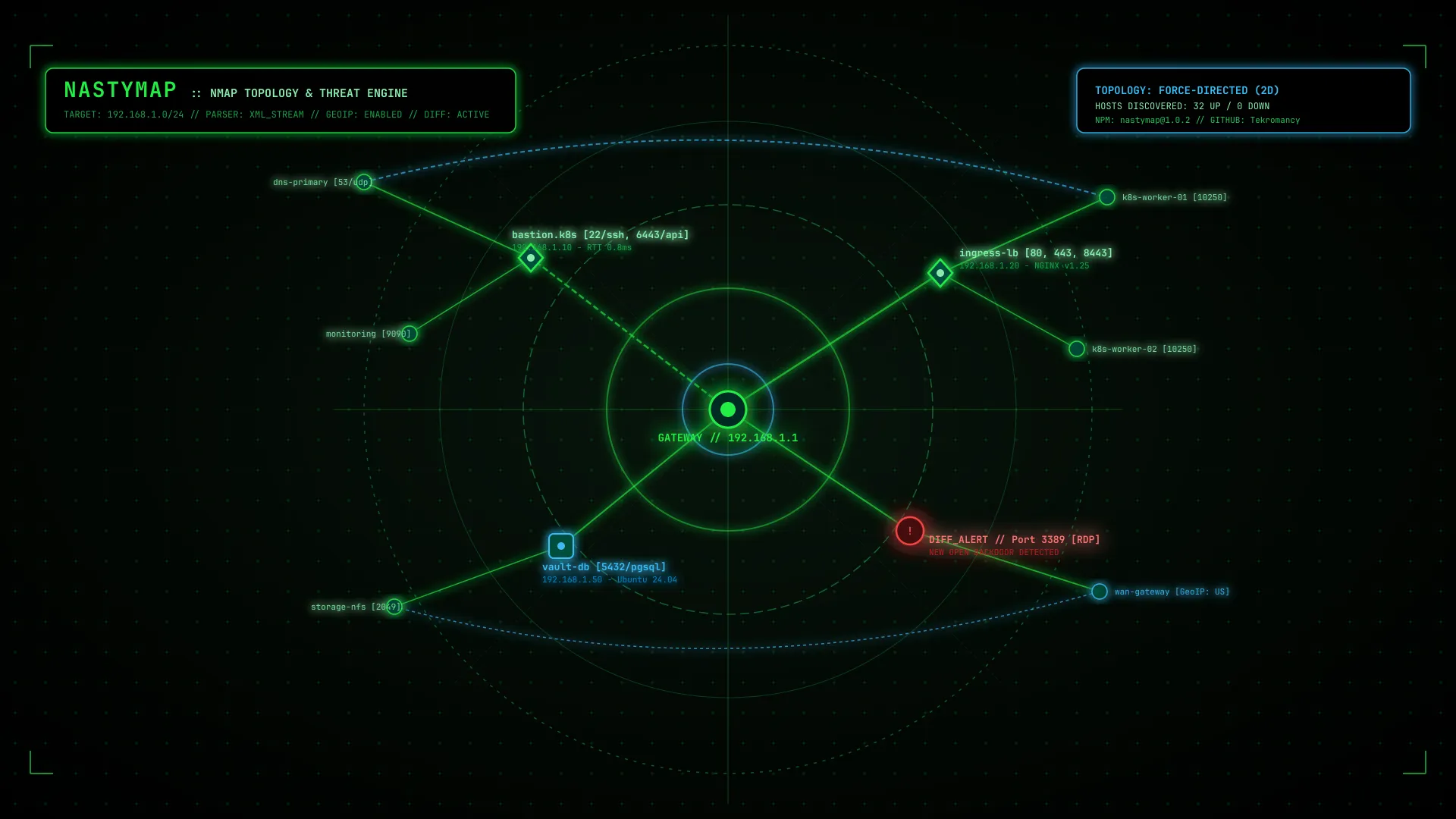
NastyMap is a high-performance interactive React and TypeScript visualization library designed to parse complex Nmap XML outputs and transform raw reconnaissance data into dynamic force-directed topology graphs, geographic GeoIP world threat maps, and automated incident diffing matrices.
Architecture of the Monorepo
NastyMap is engineered as a modern, modular monorepo containing both reusable UI/parser packages and standalone operator applications:
NastyMap/
├── packages/
│   └── nastymap/             # Reusable React/TypeScript NPM library
│       ├── src/
│       │   ├── parser/       # High-speed streaming XML parser (fast-xml-parser)
│       │   ├── topology/     # Graph layout engines (Force, Traceroute Tree, Radial, Subnet)
│       │   ├── geoip/        # GeoIP resolver & canvas coordinate mapper
│       │   ├── diff/         # Security diff engine (Added/Removed/Modified)
│       │   ├── export/       # SVG, PNG, and standalone HTML report generator
│       │   ├── components/   # <NmapTopologyView />, <NmapGeoMap />, <NmapDiffView />
│       │   └── hooks/        # Custom state hooks (useNmapScan)
├── apps/
│   ├── nastymap-example/     # Flagship Next.js 16 + React 19 web application
│   └── nastymap-ink-example/ # Interactive Terminal UI (TUI) powered by Ink CLI
├── docs/
│   └── nastymap.1.xml        # DocBook XML 4.5 Unix man page
└── installer/
    └── nastymap.nsi          # NSIS script for Windows desktop installer packaging
Core Capabilities
1. Robust Streaming XML Parsing
Nmap XML files frequently exceed dozens of megabytes when scanning large Class B or Class A subnets with service versioning (-sV) and default NSE scripts (-sC).
The parseNmapXml engine gracefully streams and normalizes all primary Nmap XML tags:
<nmaprun>execution arguments and scanner timing metadata<host>status (Up, Down, Filtered) and IP/MAC hardware addresses<ports>with protocol, service fingerprint, product version, and CPE identifiers<os>detection fingerprints, vendor matches, and kernel family accuracy percentages<trace>traceroute intermediate hops, TTL distance, and millisecond RTT latency<hostscript>output from NSE vulnerability scripts (e.g.,ssl-cert,smb-vuln,vulners)<runstats>scan metrics, finished timestamp, and elapsed time counters
2. Multi-Layout Dynamic Topology Engine
Static node diagrams fail when networks scale beyond twenty devices. NastyMap features an interactive canvas/SVG graph visualizer (<NmapTopologyView />) supporting four layout algorithms:
- Force-Directed (2D Physics): Real-time Verlet physics simulation with repulsion charges and link springs to untangle complex mesh topologies.
- Traceroute Route Tree: Hierarchical tree ordering derived directly from
<trace>hops, placing the local gateway at the root and plotting intermediate routers down to perimeter targets. - Radial Concentric Rings: Positions core firewalls and routers at the center with orbital rings indicating latency rings or hop count distances.
- Subnet Grid: Groups discovered endpoints into distinct bounding boxes based on CIDR blocks (e.g.,
10.0.1.0/24vs192.168.1.0/24).
3. Geographic Threat Map (<NmapGeoMap />)
When scanning external subnets or public cloud infrastructure across multiple availability zones, NastyMap geocodes WAN IP addresses onto an interactive vector world map. Discovered nodes are clustered by city, with curved ballistic flight paths visualizing the traceroute hops leaping across continents.
4. Automated Incident Scan Diffing (<NmapDiffView />)
One of the most tedious tasks in incident response is comparing a baseline scan against an active intrusion:
[+] NEW HOSTS DETECTED:      192.168.1.188 (Rogue AP / Kali Linux)
[!] OPEN PORT ALTERATION:    192.168.1.20:3389/tcp [OPEN] (ms-wbt-server RDP)
[-] UNRESPONSIVE HOSTS:      192.168.1.5  (Primary DC offline)
The compareNmapScans(scanA, scanB) engine produces a structured differential object that can be rendered visually via <NmapDiffView />, color-coding additions (+), removals (-), and modified service versions with instant visual clarity.
Quick Start: Using nastymap in React
Install the library and its peer icons via npm or pnpm:
pnpm add nastymap lucide-reactEmbedding Interactive Topology
import React from 'react';
import { NmapTopologyView, parseNmapXml } from 'nastymap';

export function SecurityConsole({ xmlString }: { xmlString: string }) {
  const scan = parseNmapXml(xmlString);

  return (
    <div className="w-full h-[750px] bg-black border border-green-500/30 rounded-xl overflow-hidden">
      <NmapTopologyView
        scan={scan}
        initialLayout="force"
        onSelectHost={(host) => {
          console.log(`Selected host: ${host.ipv4 || host.id}`);
        }}
      />
    </div>
  );
}
Comparing Two Security Scans
import React from 'react';
import { NmapDiffView, parseNmapXml } from 'nastymap';

export function BreachIncidentAnalysis({
  baselineXml,
  currentXml
}: {
  baselineXml: string;
  currentXml: string;
}) {
  const baseline = parseNmapXml(baselineXml);
  const current = parseNmapXml(currentXml);

  return (
    <NmapDiffView
      scanA={baseline}
      scanB={current}
    />
  );
}
The Ink CLI Terminal Interface
For operators working inside SSH bastion hosts without a browser, NastyMap includes nastymap-ink-example, an interactive Terminal User Interface (TUI) powered by Vadim Demedes’ Ink:
# Clone the repository
git clone https://github.com/Tekromancy/NastyMap.git
cd NastyMap
pnpm install

# Launch the interactive terminal UI with any Nmap XML output
pnpm --filter nastymap-ink-example start /path/to/scan.xml
The TUI renders full ASCII route trees, live host status summaries, port tables, and a lightweight terminal world map directly inside your standard terminal emulator.
Exporting & Report Generation
NastyMap also doubles as a reporting pipeline:
- Vector SVG: Exports zero-loss vector diagrams of any active layout (
exportSvgElement). - High-Resolution PNG: Client-side canvas rasterization up to 4K resolution (
exportToPng). - Standalone HTML: Generates a self-contained, single-file HTML report with zero external dependencies (
generateHtmlReport), perfect for air-gapped security audits and executive deliverables.
Project Links & Installation
- NPM Package: https://www.npmjs.com/package/nastymap (
npm i nastymap) - GitHub Repository: https://github.com/Tekromancy/NastyMap
- Author & Maintainer: Tekromancy / Joshua Edward McLaughlin Cox
// ABOUT THE AUTHOR
Joshua Edward McLaughlin Cox
Technomancer & Systems ArchitectPassionate about low-level Linux systems engineering, high-scale Kubernetes deployments, local artificial intelligence pipelines, and defensive security. Building robust, sovereign computing environments that stand the test of time.